
DevOps Compliance Solution Built for Audit-Ready Teams
Automate your DevOps audit trail, meet regulatory requirements, and give your compliance team a verifiable system of record, without slowing down development.
Why DevOps Compliance Is Harder Than It Looks
Compliance teams and development teams have historically worked in silos. Security and compliance requirements arrive late in the development lifecycle, after code is written, infrastructure is deployed, and habits are formed. Fixing compliance issues at that stage is expensive and disruptive.
The same pattern plays out with data protection. Regulatory requirements demand demonstrable controls over your source code and development data. But most DevOps workflows have no native audit trail for backup activity, no verifiable record of data integrity, and no structured way to show an auditor what happened to a repository and when.
The Compliance Gaps That Auditors Find First
- No documented backup and recovery process for source code repositories
- No audit trail showing who triggered backups, restores, or configuration changes
- No evidence that backups are tested and restorable, not just created
- No access controls separating who can read data from who can restore or delete it
- No exportable compliance reports tied to specific time periods
These are not edge cases. They are the most common findings in a DevOps audit. GitSec is built to close all of them.
How GitSec Works as a DevOps Compliance Platform
1. Immutable Audit Trail — Every Action Logged
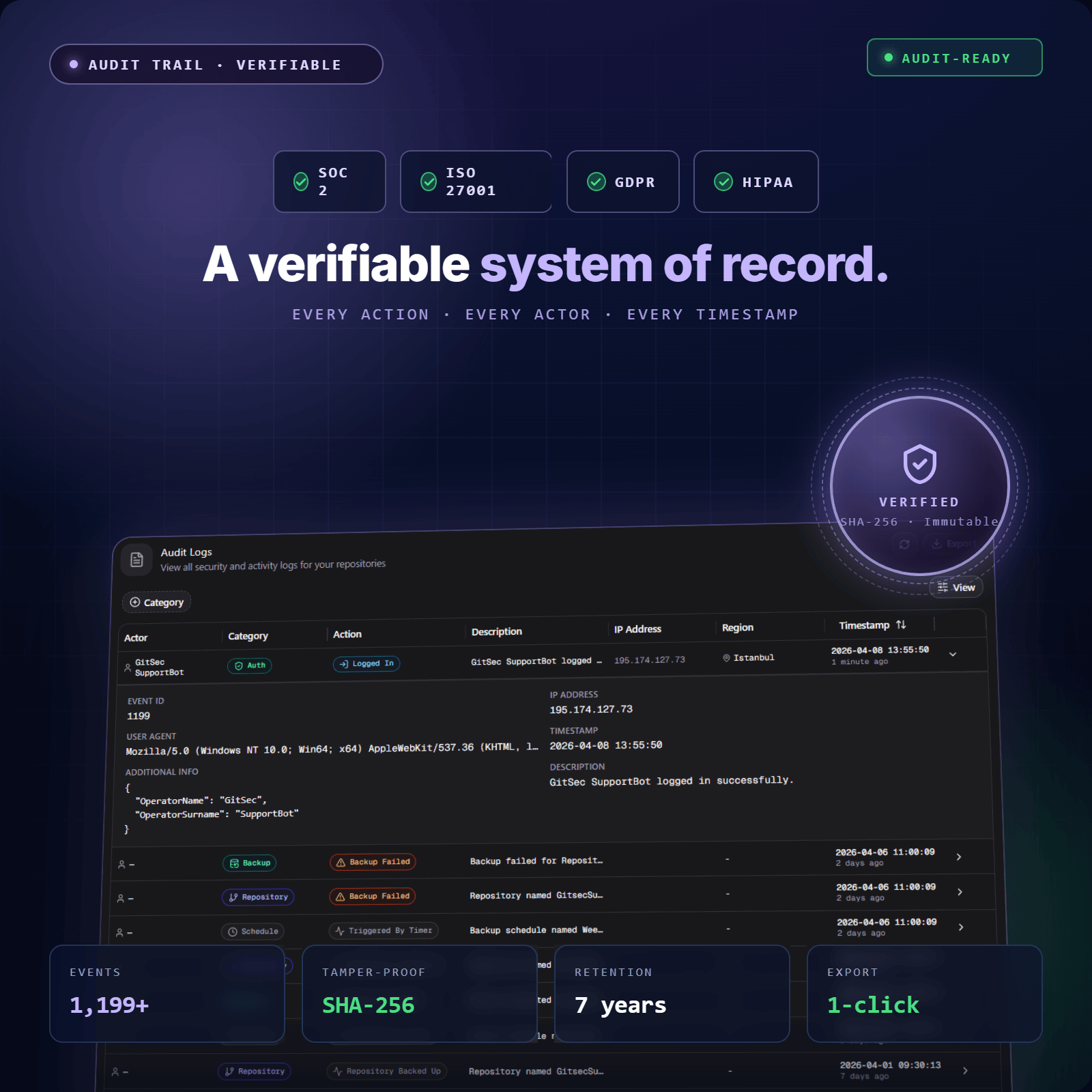
GitSec logs every event across your backup environment. Backup created. Backup failed. Restore initiated. Storage connected. Admin added. Settings changed. Nothing is omitted.
Each log entry is timestamped and tied to a specific user action. The result is a complete, tamper-evident audit trail that your compliance team can reference at any time. This is the system of record that auditors ask for, and most DevOps teams don’t have.
Logs are exportable in CSV and JSON formats. Share them directly with auditors, feed them into your SIEM, or store them in your own compliance documentation system.
2. SLA Reports — Evidence Your Backups Actually Run
Knowing that backups are scheduled is not the same as knowing they run. GitSec generates SLA reports that document backup activity over a given period, which repositories were backed up, when, how long each took, and whether they succeeded or failed.
This is the evidence layer that regulators and auditors require. Not a screenshot of a settings page. Not a verbal assurance. A documented, exportable record showing your backup and recovery process is functioning as configured.
3. Role-Based Access Control — Least Privilege Across Your Team
DevOps compliance requires separation of duties. Not every team member should be able to trigger a restore, modify backup schedules, or access sensitive configuration settings. GitSec’s role-based access control (RBAC) lets you define what each team member can see and do.
This matters for two reasons. First, it reduces the risk of accidental or unauthorised changes to your compliance processes. Second, it gives auditors a clear, documented answer to the question: “Who has access to what, and why?”
4. Compliance Dashboard — Activity Page and Backup History
GitSec’s Activity page and backup history give your compliance team full visibility into the state of your backup environment at any point in time. Browse backup snapshots by repository, filter by date range, and review the status of every job.
A dedicated compliance and audit dashboard is on the GitSec roadmap. When available, it will consolidate SLA reporting, audit log review, and compliance checks into a single view purpose-built for compliance teams.
5. Verifiable Backup Integrity — Compliance Checks That Mean Something
A backup that can’t be verified is not a compliance control. GitSec validates every backup with SHA-256 checksums on creation and runs scheduled integrity checks automatically. Before any restore, checksums are validated again.
This gives your compliance team something most backup tools cannot: documented, testable evidence that your data is intact. Not just backed up, verifiably restorable.
COMPLIANCE IN THE DEVOPS WORKFLOW
Shifting Compliance Left — Building It Into the DevOps Workflow
The shift left principle means catching issues earlier in the development lifecycle, before they become costly compliance problems. In the context of DevOps compliance, this means embedding compliance checks into the DevOps workflow itself, not bolting them on after the fact.
GitSec supports this approach in three concrete ways.
Push event backups
trigger a backup on every git push. Every commit that enters the development lifecycle is immediately protected and logged. There is no window between a code change and its first backup.
Per-repository backup policies
let your compliance team configure protection requirements at the repository level. Critical repositories get push-event backups and hourly schedules. Less active repositories get daily backups. Compliance as code, applied through configuration rather than manual process.
Automated alerts
notify your security and compliance teams in real time when a backup fails, when anomalous activity is detected, or when a repository goes unprotected. Compliance issues surface immediately, not at the next audit.
This is continuous compliance automation, not point-in-time audit preparation. Your compliance posture is maintained as teams collaborate and development moves forward, not scrambled together when an auditor arrives.
What GitSec Captures — Your Complete Development Record
A compliant DevOps audit requires more than code backups. Pull requests, issues, and review history are part of your organisation’s data security posture. They document decisions, approvals, and the development lifecycle in ways that regulators care about.
| Scope | Status |
|---|---|
Code & Commits (all branches, tags, full history) | ✅ Active |
Pull Requests (including review and approval data) | ✅ Active |
Issues (labels, assignees, comments) | ✅ Active |
Wiki Pages | 🕐 Coming Soon |
Projects | 🕐 Coming Soon |
Releases | 🕐 Coming Soon |
Supporting Your Regulatory Compliance Requirements
GitSec is GDPR compliant with data residency options in the EU and US. Beyond GDPR, GitSec’s data protection and audit capabilities help development teams and compliance teams build the evidence base required by a range of frameworks.
| Framework | How GitSec Helps |
|---|---|
GDPR | GDPR-compliant infrastructure. EU/US data residency. Verifiable data integrity. Exportable audit logs. |
SOC 2 | Immutable backups. Access controls. Documented backup and recovery processes. SLA reports. |
ISO 27001 | Audit trail for all backup events. RBAC. Integrity verification. Incident detection and alerting. |
HIPAA | Data security controls. Encrypted backups. Role-based access. Exportable compliance documentation. |
NIS2 / DORA | Business continuity controls. Recovery capability documentation. Backup frequency and retention records. |
Who It’s For
Built for Every Team with a Compliance Responsibility
Compliance Teams
Get the audit trail and exportable reports you need to demonstrate control. Stop chasing developers for backup logs the week before an audit. GitSec gives your compliance team direct access to a verifiable, timestamped record of every backup event, in the format your auditors require.
Security Teams
Define backup policies, enforce RBAC, monitor anomalous activity in real time, and receive alerts when something goes wrong. GitSec brings your data security posture into the DevOps workflow, not as an afterthought, but as a control system running continuously alongside development.
Development Teams
Set up once. Forget about it. GitSec runs scheduled and push-triggered backups silently in the background. Your development teams don’t need to change how they work. Compliance happens automatically as they commit, push, and merge.
Your Data, Your Jurisdiction
GitSec’s managed storage runs in EU and US regions, covering the most common data residency requirements out of the box. For teams with stricter requirements, BYOS lets you direct all backup data to your own cloud infrastructure.
| Storage Option | Supported |
|---|---|
GitSec Managed (EU / US) | ✅ Active |
AWS S3 | ✅ Active |
Azure Blob Storage | ✅ Active |
Google Drive | ✅ Active |
OneDrive Personal | ✅ Active |
Huawei OBS | ✅ Active |
OneDrive Business | 🕐 Coming Soon |
Backup data sent to your own storage bucket is fully within your audit boundary. Your cloud provider’s access logs, your encryption keys, your infrastructure. GitSec handles the backup logic. You own the data.
GETTING STARTED
Set Up Your DevOps Compliance Audit Trail in 3 Steps
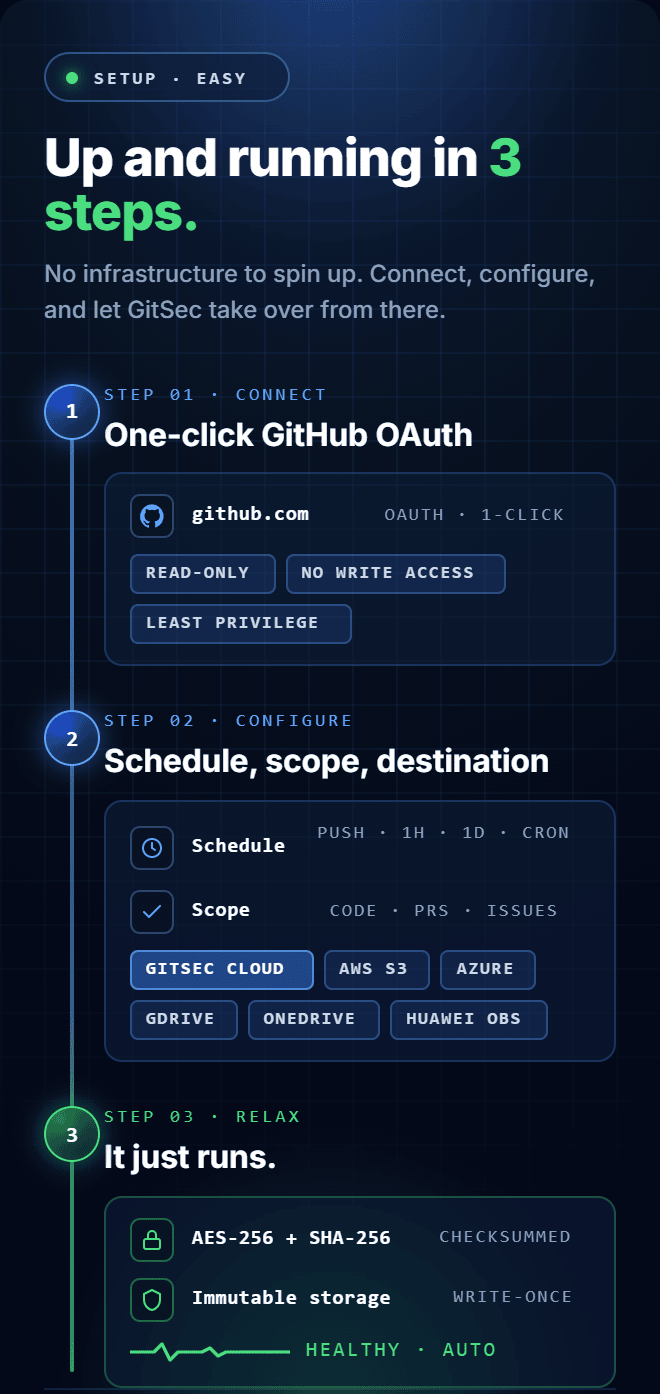
Step 1 — Connect Your Repositories
Link your GitHub or Bitbucket account via OAuth. GitSec connects with read-only permissions — no write access is granted during setup. GitLab support is coming soon.
Step 2 — Configure Backup Policies and Access Controls
Set your backup schedules per repository. Enable push event backups for critical repos. Invite your team members to the workspaces. Configure your storage destination. Your compliance processes are in place before the first backup runs.
Step 3 — Monitor, Report, and Stay Audit-Ready
The Activity page gives your compliance team continuous visibility. Export audit logs in CSV or JSON at any time. PDF export is coming soon. Generate SLA reports for any period. When an auditor asks for evidence, you have it, in the format they need, immediately.
Frequently Asked Questions
Got Questions? We’ve Got Answers
Everything you need to know about protecting your repositories with GitSec
What events does GitSec’s audit trail log?
GitSec logs all events across your backup environment — backup created, backup failed, restore initiated, admin added, storage configured, settings changed, and more. Every entry is timestamped and tied to a specific user action. Logs are exportable in CSV and JSON formats for sharing with auditors or feeding into your existing compliance documentation system. PDF export is coming soon.
Can GitSec generate compliance reports for a specific time period?
Yes. GitSec generates SLA reports documenting backup activity over any configured period, including which repositories were backed up, when, duration, and status. These reports provide the documented evidence of your backup and recovery process that most compliance frameworks require.
Does GitSec support role-based access control?
Yes. GitSec’s RBAC lets you control what each team member can see and do within the platform. This separation of duties is a core compliance requirement under most regulatory frameworks — ensuring that the team members who configure backup policies are not the same ones who can trigger restores or modify access settings.
Is GitSec compliant with GDPR?
Yes. GitSec is GDPR compliant with data residency options in the EU and US. For other frameworks (SOC 2, ISO 27001, HIPAA, NIS2, DORA) GitSec provides the technical controls and audit documentation that help your organisation meet compliance requirements. GitSec is not itself certified under these frameworks.
What is the difference between GitSec’s compliance approach and a dedicated compliance-as-code tool?
Dedicated compliance-as-code tools enforce policy in your CI/CD pipeline. GitSec handles a different and complementary layer: the backup, recovery, and audit trail for your source code and development data. Together, they form a complete security and compliance posture for your DevOps workflow, GitSec ensures the data itself is protected and auditable, regardless of what happens in your pipeline.
Everything! We back up all branches, tags, commit history, issues, pull requests, code reviews, wiki pages, release notes, and even Git LFS files. Your entire development story is protected, not just the code.
Your Next Audit Doesn’t Have to Be a Fire Drill.
Most DevOps compliance gaps are discovered at audit time — when fixing them is expensive and disruptive. GitSec gives your compliance team continuous visibility, your security team active controls, and your development teams protection that runs automatically in the background.
Immutable backups. Full audit trail. Exportable reports. RBAC. Set up in under five minutes.
