
Fast Git Recovery with Minimal Downtime
A complete DevOps disaster recovery strategy built around immutable backups, point-in-time restore, and cross-platform recovery — so your team is back online before the damage spreads.
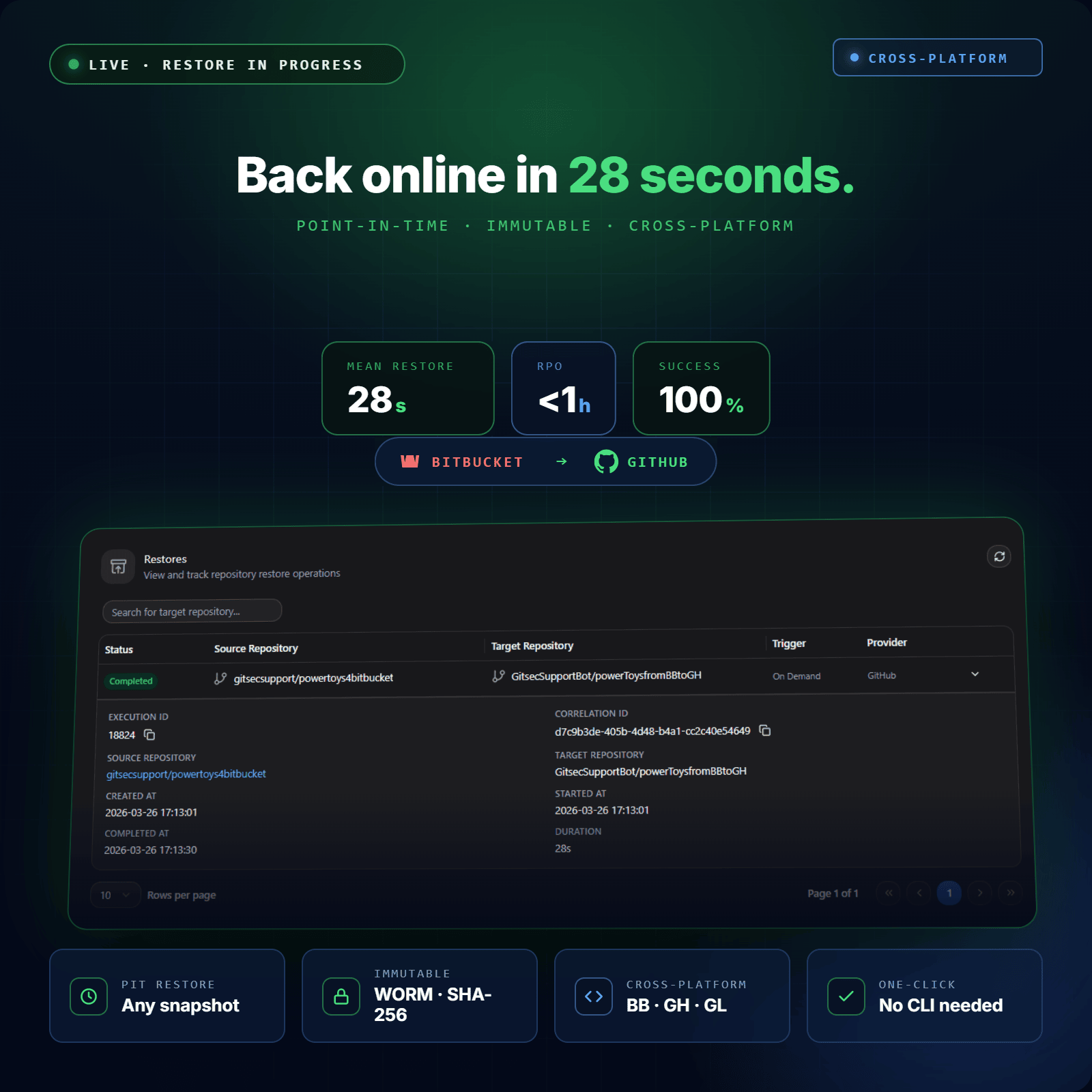
When git reset, git checkout, and git add Can’t Save You
Native Git commands are powerful. git reset rolls back local changes. git checkout recovers individual files from a previous commit. git add stages changes you want to keep. For everyday mistakes on a local machine, these commands handle most situations well.
But they have a hard limit. They only work when the remote repository still exists.
If a repository is deleted from GitHub, the commit hash you need is gone. git reflog only tracks local history, it cannot see what happened on the remote. If a force push overwrites the main branch, the previous commit is gone from the remote and there is nothing in the standard Git toolchain to bring it back.
This is the gap that GitSec fills. When native Git recovery fails, GitSec’s external, immutable backup snapshots are the only path back.
The Disaster Scenarios Your DevOps Team Needs to Plan For
Accidental Deletion
A developer with admin rights deletes the wrong repository. A CI/CD pipeline script runs with broader permissions than intended. An automation tool executes a destructive command. Data loss from human error is the most common disaster scenario in DevOps environments, and it is entirely unrecoverable without an external backup.
Force Push Over Critical History
git push –force is the most dangerous command in daily DevOps use. It rewrites remote history without warning. If it overwrites the wrong branch, or the right branch at the wrong time, the previous commit history is gone from the remote repository permanently.
Provider Outage
GitHub outages happen. When your Git provider goes down, your CI/CD pipelines stop, your development teams are blocked, and your production environment may be unable to deploy. A disaster recovery strategy that depends entirely on your Git provider offers no protection when the provider itself is the problem.
Ransomware and Account Compromise
An attacker with access to your GitHub organisation can delete repositories, overwrite branches, and destroy years of commit history in minutes. Without an external, isolated backup, there is no path to recovery. With GitSec, your backups are stored outside your GitHub environment, unreachable by an attacker who compromises your Git credentials.
Gitsec Disaster Recovery Architecture
How GitSec Delivers Git Disaster Recovery
Immutable Backups — Your Recovery Foundation
Every GitSec backup snapshot is immutable. Once created, it cannot be modified, overwritten, or deleted. Snapshots are validated with SHA-256 checksums on creation and verified again before every restore.
Backups run automatically, on a schedule, on every push event, or on demand. By the time a disaster scenario hits, you already have a clean, verified copy of your source code, pull request history, issues, and CI/CD configuration waiting in isolated storage. Data protection is not something you set up after the crisis. It is already in place.
Point-in-Time Recovery — Go Back to Any Snapshot
GitSec stores a full history of immutable snapshots for every repository. When disaster strikes, you do not have to restore the most recent backup. You can browse the complete timeline and restore from any point in time.
This matters in scenarios where damage is not immediately obvious. A corrupted file introduced three days ago. A bad merge that went unnoticed over a weekend. Point-in-time recovery lets your DevOps team identify the last known-good state of the repository and restore from that exact moment, not just from the backup that happened to run last.
Granular Recovery — Restore What You Need, Nothing More
Not every disaster requires a full repository restore. GitSec supports recovery at any level of granularity. Restore a single branch. Restore the entire repository. Restore to an existing repository or create a new one from scratch.
This flexibility directly reduces your Recovery Time Objective (RTO). Restoring a single branch is faster than restoring a full repository. Restoring to a new repository in a clean organisation is faster, and safer than overwriting a potentially compromised environment.
Cross-Platform Recovery — Restore Between Providers
GitSec supports cross-platform restore. If your GitHub repositories are backed up, you can restore them to a Bitbucket environment, and vice versa. For DevOps teams planning for provider-level failures or considering a platform migration, this is a critical capability.
Your disaster recovery strategy should not be limited by the availability of a single Git provider. GitSec’s cross-platform recovery removes that constraint.
CI/CD Pipeline Protection
Your CI/CD pipelines are as critical as your source code. GitSec backs up CI/CD configuration files, including GitHub Actions workflows and .github/ directory contents, alongside your repositories. When a disaster scenario takes your pipelines offline, your pipeline configuration is recoverable, not just the code it builds and deploys.
For DevOps teams running production environments where deployment depends on CI/CD pipelines, this is the difference between a recoverable outage and a full rebuild from memory.
RECOVERY TIME: RTO AND RPO
Understanding RTO and RPO for Git Disaster Recovery
Two metrics define how effective your disaster recovery strategy actually is.
Recovery Point Objective (RPO)
is how much data you can afford to lose. If your RPO is one hour, your most recent backup must be no more than one hour old at any given time. GitSec’s push event backups bring your RPO as close to zero as possible, a backup fires on every git push, so your last clean snapshot is as recent as your last commit.
Recovery Time Objective (RTO)
is how long it takes to restore operations after a disaster. Industry best practice for DevOps teams is an RTO measured in minutes for critical repositories, not hours. GitSec’s four-step Restore Wizard is designed for speed: select target organisation, choose snapshot, configure target repository, confirm.
For minimal downtime in real time disaster scenarios, the recommended GitSec configuration is push event backups for critical repositories combined with BYOS storage in the same cloud region as your production environment.
Regularly Test Your Disaster Recovery Plan — GitSec Makes It Safe
A disaster recovery strategy that has never been tested is not a strategy. It is a hope.
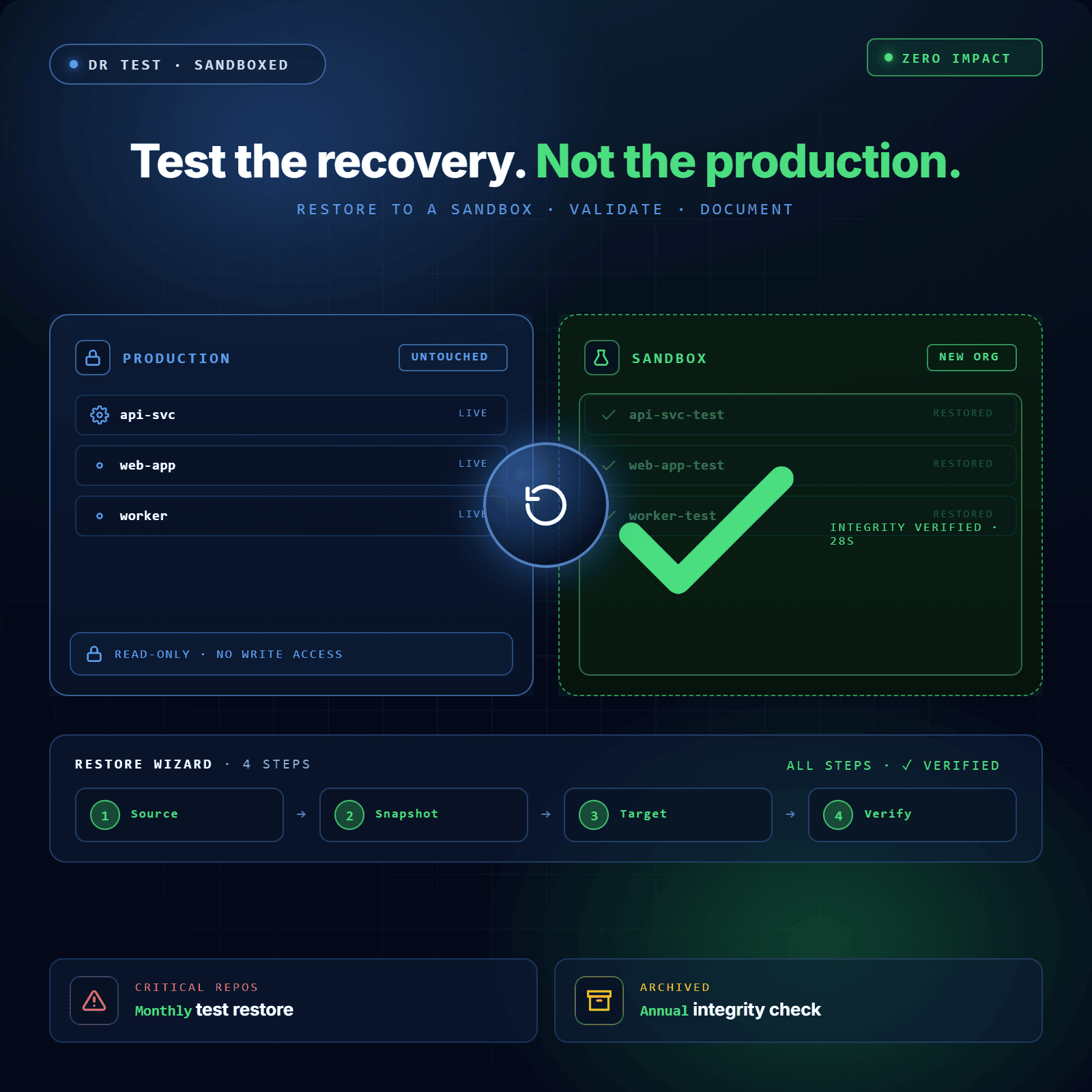
GitSec lets your DevOps team test the full recovery process without touching any live environment. Create a restore to a brand-new GitHub organisation, or restore to a separate test repository. The full four-step Restore Wizard runs exactly as it would in a real disaster, so your team knows the process, knows the timing, and knows what to expect before they need it.
Regular testing also validates your backup integrity. A backup that fails to restore is not a backup. GitSec’s on-demand validation and scheduled integrity checks give you ongoing confidence. But nothing replaces actually running a restore and confirming the result.
Recommended testing cadence for DevOps teams:
- Critical production repositories: monthly test restore to a new organisation
- Archived repositories: annual verification of backup integrity
Your Backup Storage, Your Disaster Recovery Boundary
For true disaster recovery, backup storage must be isolated from your primary environment. GitSec’s architecture enforces this. The Backup App is read-only and cannot delete or modify your repositories. Backup storage (whether GitSec-managed or BYOS) is unreachable from your GitHub credentials.
Storage Option | DR Use Case |
GitSec Managed (EU / US) | Out-of-the-box isolation. Zero configuration. |
AWS S3 | Ideal for teams with existing AWS infrastructure. |
Azure Blob Storage | Recommended for DevOps teams running workloads on Azure. |
Google Drive | Accessible, simple BYOS for smaller teams. |
OneDrive Personal | Personal account backup destination. |
Huawei OBS | Available for teams with Huawei Cloud infrastructure. |
OneDrive Business | 🕐 Coming Soon |
Multi-storage mode sends every backup to both GitSec-managed infrastructure and your own BYOS bucket simultaneously. In a disaster scenario, you have two independent, isolated recovery paths.
Frequently Asked Questions
Got Questions? We’ve Got Answers
Everything you need to know about disaster revovery with GitSec
Can GitSec recover a repository that has been completely deleted from GitHub?
Yes. GitSec’s backups are stored externally and independently of your GitHub environment. If a repository is deleted (intentionally or accidentally) your most recent backup snapshot remains intact and restorable. The recovery process starts from the GitSec dashboard, not from GitHub.
What is the difference between git reflog and GitSec for disaster recovery?
git reflog tracks the history of HEAD movements on your local machine. It can recover commits that exist locally but were never pushed, or recover a local branch after a bad reset. It cannot recover data that was deleted from the remote repository, and it only exists on the machine where the local clone lives. GitSec backs up the remote repository externally, providing recovery capability that no local Git tool can replicate.
Can we restore to a different GitHub organisation for DR testing?
Yes. GitSec supports restore to any GitHub organisation where the Restore App is installed, including brand-new organisations created specifically for DR testing. This lets your DevOps team run full recovery drills in a completely isolated environment without any risk to live repositories.
Does GitSec back up CI/CD pipeline configuration?
Yes. GitSec backs up CI/CD configuration files including GitHub Actions workflows and .github/ directory contents alongside your repositories. In a disaster scenario, your pipeline configuration is recoverable along with your source code.
Can we restore from a GitHub backup to a Bitbucket repository?
Yes. GitSec supports cross-platform restore. Backup your GitHub repositories and restore to Bitbucket, or vice versa. This is particularly valuable for disaster recovery strategies that need provider independence, or for teams planning a platform migration.
Everything! We back up all branches, tags, commit history, issues, pull requests, code reviews, wiki pages, release notes, and even Git LFS files. Your entire development story is protected, not just the code.
When the Disaster Scenario Hits, It’s Too Late to Plan.
Every minute of downtime has a cost. For a DevOps team of five engineers, an hour of blocked access to a production environment is an hour of lost productivity, blocked deployments, and compounding business continuity risk.
GitSec gives your team a documented, tested, automated disaster recovery strategy, built around immutable backups, real-time protection, and a restore process that takes minutes, not hours.
Set it up before you need it. That is the only time it works.
